Can Turnitin Detect AI Writing? What CIPD Students Need to Know
If you're studying for a CIPD qualification, you've probably heard warnings about AI detection. With CIPD now requiring AI reports alongside assignment submissions, understanding how tools like Turnitin detect AI-generated content has become essential for every student.
This guide explains how AI detection works, what CIPD expects, and how you can submit your assignments with confidence.
Does Turnitin Detect ChatGPT and Other AI?
Yes. Turnitin introduced AI detection capabilities in 2023, and the technology continues to improve. The tool can identify content generated by:
- ChatGPT (all versions including GPT-4)
- Google Bard/Gemini
- Claude
- Other large language models (LLMs)
Turnitin's AI detection works by analysing writing patterns that are characteristic of AI-generated text. These include:
Predictable word choices: — AI tends to select statistically likely words
Consistent sentence structure: — Less variation than human writing
Lack of personal voice: — Generic tone without individual perspective
Smooth but shallow content: — Coherent but lacking depth or nuance
The tool provides a percentage score indicating how much of the text it believes was AI-generated, along with highlighted sections.
How Accurate Is AI Detection?
No AI detection tool is perfect. There are two types of errors:
False positives — Your genuine writing is incorrectly flagged as AI. This can happen if:
- Your writing style is very formal or structured
- You use common phrases or standard academic language
- English isn't your first language (some patterns overlap with AI)
- You've heavily edited AI suggestions into unrecognisable form
False negatives — AI-generated content isn't detected. This can happen if:
- The text has been paraphrased or edited
- Specific AI-evading techniques have been used
- The AI output was particularly human-like
Turnitin claims around 98% accuracy at the document level, but individual sections may be more or less reliable. Training providers and assessors understand this—a flag isn't an automatic accusation.
What Does CIPD Require?
CIPD updated its policies in response to AI tools. Key requirements:
AI Reports Are Now Mandatory
Most CIPD training providers now require an AI detection report to be submitted alongside your assignment. This typically includes:
- An overall AI detection score
- Highlighted sections flagged as potentially AI-generated
- A plagiarism/similarity score (separate from AI detection)
Using AI Is Malpractice
CIPD's position is clear: using AI to generate assignment content constitutes malpractice. This applies whether you use ChatGPT, Bard, or any other tool to write sections of your work.
Consequences can include:
- Failing the assignment
- Being required to resubmit
- Investigation by your training provider
- Removal from your course
- Impact on your professional reputation
Legitimate Uses of AI
You CAN use AI tools for:
Research: — Understanding concepts and finding sources
Idea generation: — Brainstorming approaches to questions
Grammar checking: — Tools like Grammarly (note: some include AI writing features)
Reference formatting: — Generating citation formats
You CANNOT use AI for:
- Writing any part of your assignment
- Generating paragraphs you then paraphrase
- Creating structure or arguments you present as your own
The test is simple: is the submitted work genuinely yours?
Why Your Own Writing Might Get Flagged
One of the most frustrating experiences is having your genuine work flagged as AI-generated. This happens for several reasons:
Formal Academic Style
Academic writing tends toward:
- Third person perspective
- Formal vocabulary
- Structured paragraphs
- Hedging language ("it could be argued...")
Unfortunately, AI also produces text with these characteristics. If your writing is very "textbook" in style, it may trigger detection.
Common Phrases and Structures
Phrases like "in conclusion," "it is important to note," and "there are several factors" appear frequently in both AI and human academic writing. Heavy use of such phrases increases flags.
Lack of Personal Examples
AI can't draw on personal workplace experience. If your assignment is entirely theoretical without specific examples from your own context, it may read more like AI output.
Over-Editing
Ironically, heavily edited and polished work can seem more AI-like than rough first drafts. The smoothness that comes from multiple revisions resembles AI's consistent output.
How to Reduce False Positives
If you're writing your own work but worried about AI detection:
Add Your Personal Voice
- Use first-person where appropriate ("In my organisation...")
- Include specific workplace examples
- Reference your own observations and experiences
- Show your thinking process, not just conclusions
Vary Your Sentence Structure
- Mix short and long sentences
- Start sentences in different ways
- Use varied vocabulary (don't repeat the same words)
- Include some complexity and nuance
Be Specific, Not Generic
- Name specific organisations, frameworks, or cases
- Reference particular CIPD resources you've used
- Include details that show genuine research
- Avoid vague generalisations
Keep Your Research Notes
- Document where ideas came from
- Save your drafts showing development
- Keep records of sources consulted
- Be prepared to discuss your work in a professional discussion
How to Check Before You Submit
Don't wait until submission to discover your work triggers AI detection. Check your assignment yourself first.
Your training provider will run your work through detection tools after you submit. But by then it's too late to fix anything. The smart approach is to check BEFORE you submit—so you can revise any flagged sections while you still have time.
Check Your Work with People Study Pro
People Study Pro includes a built-in AI and plagiarism checker specifically designed for CIPD students:
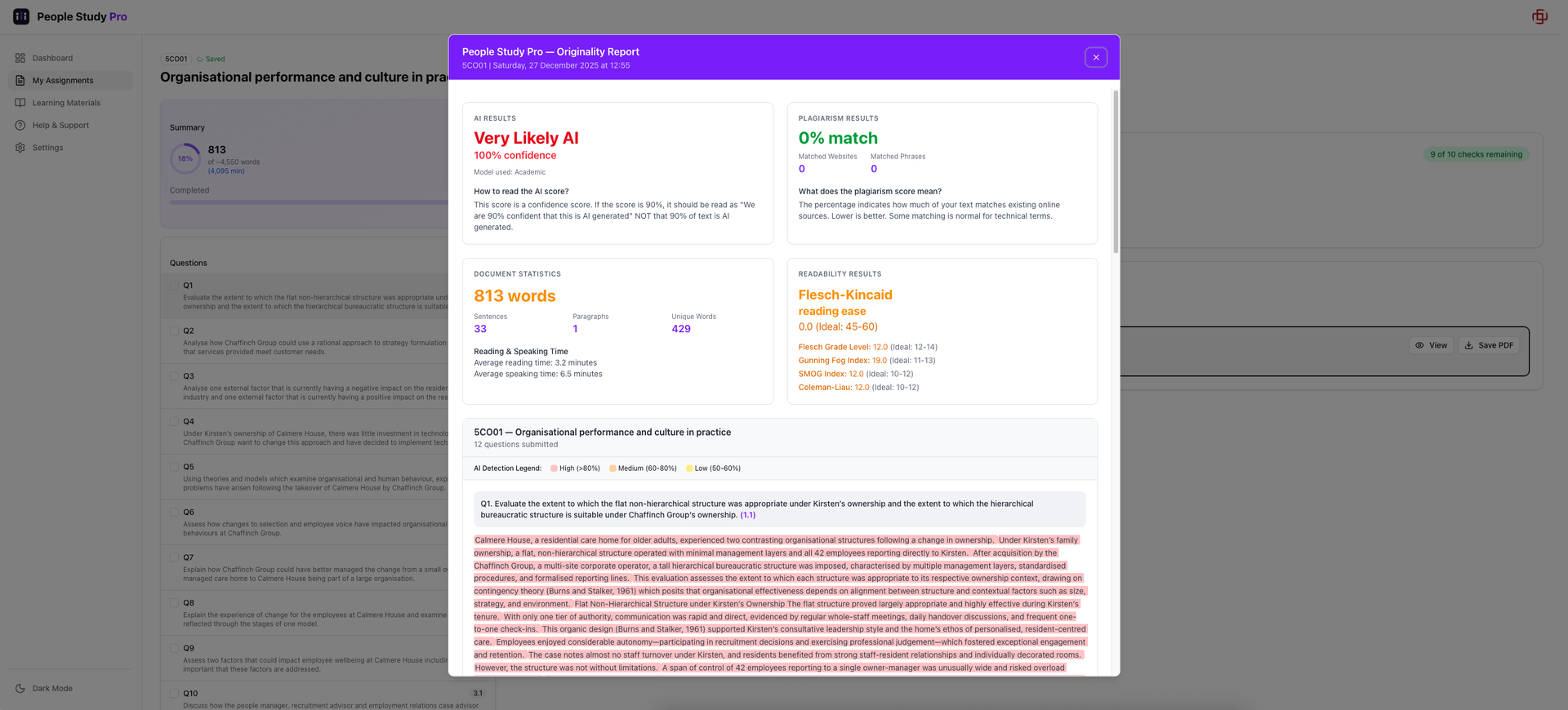
AI Detection Scan: — See exactly which sections might be flagged as AI-generated, with percentage scores
Plagiarism Check: — Catch unintentional similarity to published sources before your assessor does
Up to 10 Checks Per Unit: — Revise flagged sections and re-check until you're confident
Instant Results: — No waiting; get your report in seconds
CIPD-Focused: — Built for CIPD assignments, not generic academic work
Why check before submission? Even if you wrote every word yourself, formal academic writing can trigger AI detection. Checking first means you can add personal examples, vary your sentence structure, or adjust flagged sections—and then verify the changes worked.
Review Flagged Sections
If sections are flagged:
- Don't panic — Flags aren't proof of AI use
- Read the section — Does it sound like you?
- Add specificity — Personal examples, specific references
- Vary structure — Rewrite to add your voice
- Re-check — See if changes reduce the flag
Keep Evidence of Your Process
If questioned about your work:
- Show draft versions demonstrating development
- Explain your research process
- Discuss sources and why you used them
- Talk through your reasoning for key arguments
Genuine authors can discuss their work fluently. This is your best defence.
What If You're Accused of Using AI?
If your training provider raises concerns:
Stay Calm
A flag or question isn't the same as an accusation. Providers understand detection isn't perfect and will investigate fairly.
Be Honest
If you did use AI inappropriately, honesty is better than denial. Providers often deal more leniently with students who acknowledge mistakes.
If you didn't use AI, clearly explain your process and provide evidence.
Prepare for Professional Discussion
You may be asked to:
- Explain your methodology and approach
- Discuss specific sections in detail
- Show your research notes or drafts
- Demonstrate understanding of concepts in your work
If you wrote it yourself, this should be straightforward.
Know Your Rights
You have the right to:
- Understand the concerns raised
- Present your case
- Appeal decisions
- Access support from your training provider
The Bigger Picture
AI detection is part of a broader question: what's the point of your CIPD qualification?
CIPD assignments exist to develop your understanding of HR concepts and your ability to apply them in practice. If AI writes your work:
- You don't develop the knowledge
- You can't apply concepts in your job
- You can't discuss topics with confidence
- Your qualification doesn't represent genuine competence
The goal isn't to beat AI detection—it's to become a competent people professional. Shortcuts undermine that goal.
Using AI Ethically
AI tools can genuinely help your learning if used appropriately:
Good uses:
- "Explain the AMO model in simple terms"
- "What are the main criticisms of Herzberg's theory?"
- "Help me understand what 'critically evaluate' means"
Bad uses:
- "Write a 500-word answer to this CIPD question"
- "Paraphrase this paragraph so it sounds like me"
- "Generate an introduction for my 5CO01 assignment"
The line is clear: AI can help you understand and learn; it cannot write your work.
Summary
Yes, Turnitin detects AI: — But it's not perfect
CIPD requires AI reports: — Your provider will check
Using AI to write is malpractice: — With serious consequences
Your own writing can be flagged: — Especially formal academic style
Check before you submit: — Use tools like People Study Pro
Add personal voice: — Specific examples and your own perspective
Keep evidence: — Drafts, notes, research records
Your CIPD qualification should represent genuine competence. Write your own work, check it before submission, and you can submit with confidence.
Submit With Confidence
Worried about AI detection? Check your work before your assessor does.
People Study Pro's built-in checker lets you:
- Scan your assignment for AI detection flags and plagiarism
- See exactly which sections might cause problems
- Revise and re-check until you're confident (up to 10 checks per unit)
- Submit knowing you've done your due diligence
Your training provider uses detection tools. Now you can too—before it's too late to make changes.
The work is yours. The confidence is earned. The checking is free with your People Study Pro account.
Create your free account and check your assignment →